WHY ITSLEARNING
See why schools choose a European LMS designed for education over generic platforms.
See why schools choose a European LMS designed for education over generic platforms.
itslearning empowers teachers and helps all students reach their full potential.

Translation generated by an AI translation service
We publish release notes a few days before each mid-week update. If you are reading this, the update will be available soon. Please note that release dates may change. Some features are also released gradually, which means not all users will see them at the same time. If a feature you expected is not yet available, it will appear soon.
You can now add tree links to content in the same folder from the folder description.
As part of our ongoing work to simplify and modernise itslearning, we regularly review older functionality and whether it still meets users' needs. Based on this review, we have decided to remove Global User Search by the end of 2026.
You can still find users through more context-specific search options available throughout itslearning, such as
As part of preparing for this change, we identified printing user lists with additional user information as functionality that administrators still need. With this in mind, we have already added the option to print user lists in Administration > User and access rights.
When you copy a Page within itslearning or import content into a new Page using the ORG API, all files in each Files content block are now placed in a single list. The files are retained, but their folder structure is not preserved.
This is part of the renewal of the Page tool and extends the existing restriction on creating and editing folders in Files content blocks. To organise files in folders, use the Resources page in your course.
Administrators can now use the Print selected users operation in Administration > User and access rights to create a printable user list and choose which user information to include.
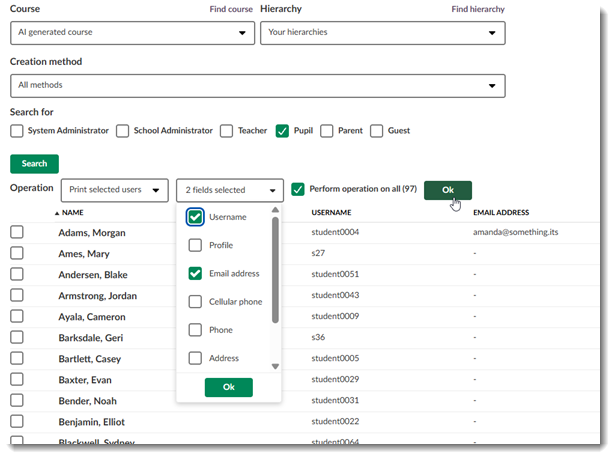
Note: A printed list can contain a maximum of 200 users. If the selection contains more users, the first 200 will be included.
| Area | Reference | Summary |
|---|---|---|
| H5P | ITS-107413 | The button to go to full-screen inside content added from H5P was not showing. We made a change to allow content from H5P to open in full-screen. |